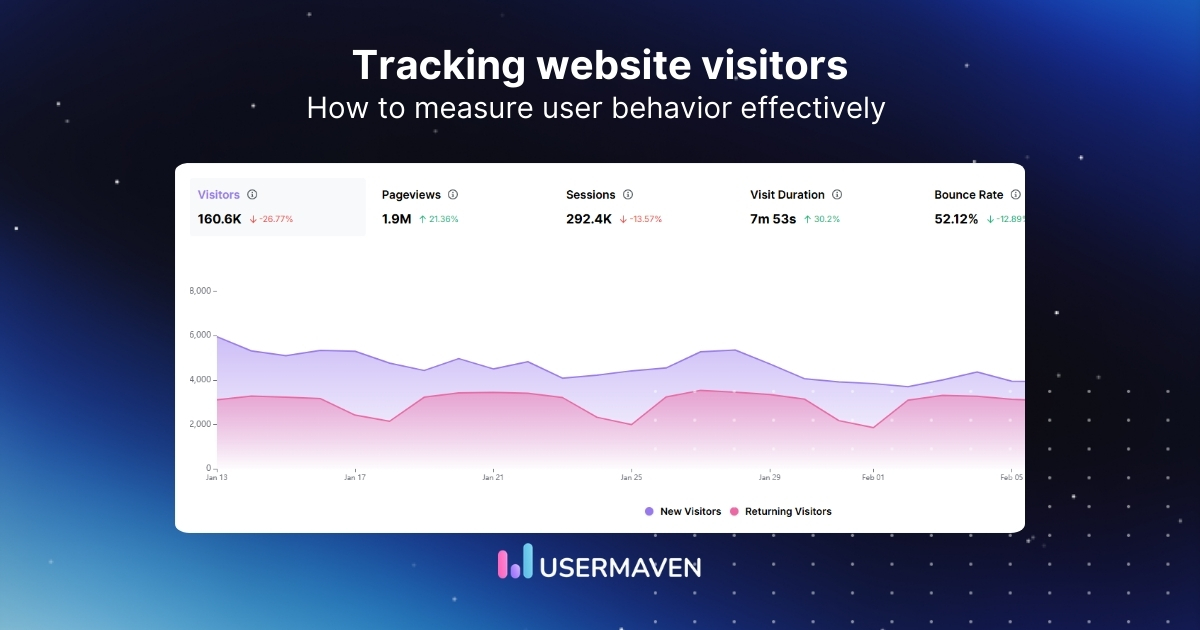
Driving traffic is only half the battle. If you’re just looking at total hits, the actual customer journey remains a mystery, leaving you with numbers that don’t explain why people leave or what keeps them.
Tracking website visitors is about seeing the behavior behind the numbers. It moves you past basic stats so you can see which pages hold attention and which specific actions indicate someone is ready to buy.
In this guide, we’ll break down how to track website visitors, what sets this apart from basic analytics, and explore the top tools you can use to effectively track visitor behavior.
What is website visitor tracking?
Website visitor tracking is the process of identifying, monitoring, and analyzing how people and companies interact with your website. Instead of looking only at totals such as pageviews or average time on page, you track actions at a deeper level for each visitor or account.
Traditional web analytics treats traffic as one big crowd. Website visitor tracking goes further by connecting behavior to real leads, users, or accounts in your CRM. For B2B teams, this often means seeing which companies land on the pricing page, which features they explore, and how often they return.
The main goal is simple. Connect website activity to real prospects so you can act on what you see. With solid tracking in place, you can:
- Prioritize outreach to visitors who show strong intent
- Personalize campaigns based on what people actually viewed
- Improve product and content decisions using real behavior
Tracking site visits helps your site stop being a black box and become one of your best sales and marketing channels.
How website visitor tracking works
Website visitor tracking works through a small JavaScript code, often called a pixel or tracking script. Here’s how it works:
- You add the script to your site’s header once, and it runs on every page load.
- Each time someone visits, the script collects data about their actions and sends it back to the analytics platform for processing.
- This data is processed in real time and grouped into sessions, visitors, and accounts, which you can view in web analytics dashboards, funnels, or tables.
To track behavior across visits, tools use identifiers like:
- Browser cookies
- First-party identifiers
- Server-side tracking
When the same browser is used, the tool links the new session to previous visits, creating a complete visitor history. For businesses managing global outreach or coordinating with international link-building agencies, cross-domain tracking can follow users across related sites to see which regional sources are actually driving long-term engagement.
Privacy is a key consideration. Modern tools comply with privacy regulations such as GDPR and CCPA, enabling you to track user activity on website pages while remaining compliant. This allows you to gather valuable insights without compromising user privacy.
What can be tracked by website visitor tracking
Here’s a closer look at what you can track:
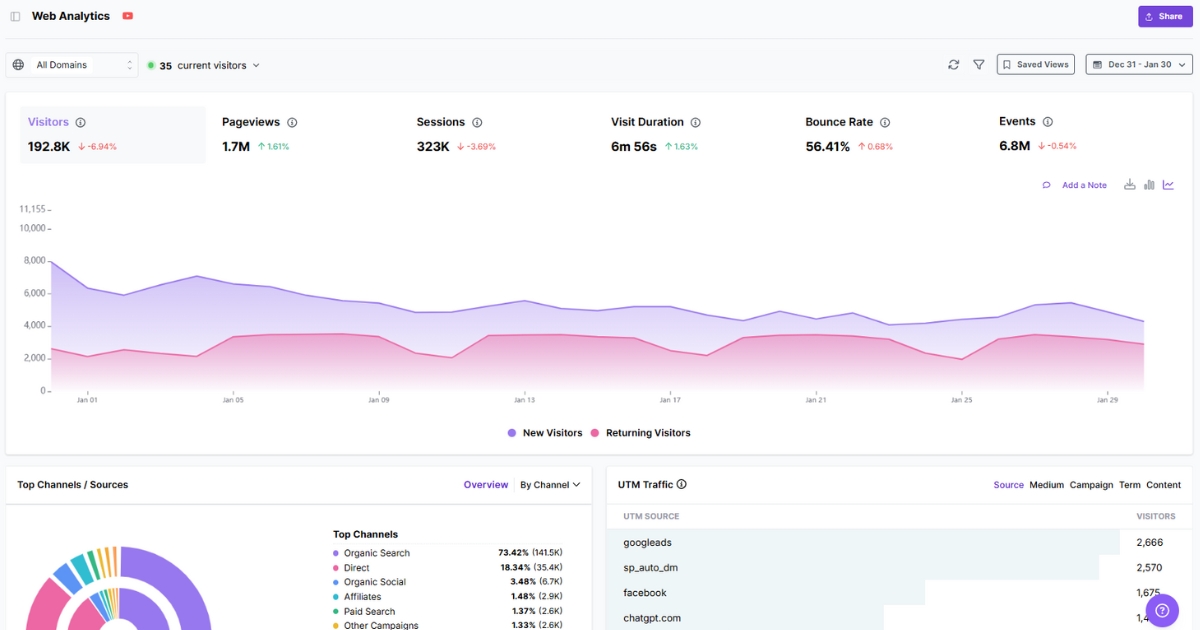
- Visitor traffic: Monitor the number of visitors to your website over time, distinguishing between new and returning users.
- Page engagement: Monitor website metrics like pageviews, session duration, and scroll depth. If you are testing new web design trends, these metrics help you see if a new layout keeps users engaged or causes them to bounce.
- Behavioral analytics: Track clicks, navigation paths, and bounce rates to uncover friction points. This is essential when working with social media influencers, as it helps you see whether their audience stays on the site or leaves immediately without following your intended path to purchase.
- Conversion tracking: Track key actions like signups, trial starts, or purchases to see which pages and channels drive the most valuable outcomes.
- Lead source tracking: Track visitor origins like paid ads and social traffic, and analyze how each channel impacts behavior and conversions. This also supports backlink management, helping you pinpoint which domains bring high-intent traffic versus low-quality visits.
- Demographics and device information: Understand visitor location, language, and device type to customize your content, design, and offers for different audience segments, enhancing the user experience.
Related: How to check traffic on any site like a pro
Website visitor tracking vs. web analytics
While both website visitor tracking and web analytics provide valuable insights, they serve different purposes.
Here’s a comparison to help you understand the key differences:
| Aspect | Website visitor tracking | Web analytics |
| Main purpose | Lead and account insight for sales and marketing | Overall site performance and traffic trends |
| Data style | Visitor and company-level behavior | Aggregated, anonymous metrics |
| Lead identification | Often identifies companies, sometimes people | Does not identify specific leads |
| CRM connection | Usually syncs visits and events to CRM records | Limited or indirect connection |
| Best fit | B2B teams, account-based marketing, sales alerts | General marketing, UX, and content planning |
The advantages of using web analytics are clear for general site performance. While basic analytics focuses on “how many,” visitor tracking focuses on “who” and “why”. For teams involved in heavy link-building strategies, visitor tracking is the only way to see which specific referral domains are sending “ready-to-buy” traffic versus “window shoppers”.
[web_analytics]
Types of website visitor tracking
Website visitor tracking tools show data in several different ways. Each method gives you a slightly different angle on how people behave on your site. When you mix these views, you move from raw numbers to a clear story about what helps visitors move forward and what stops them.
Behavior maps
Behavior maps are visual overlays that sit on top of your page designs and show where activity clusters are. Common types include:
- Heat maps use strong colors to show hot zones where many visitors move their mouse or keep it resting, while cool colors mark areas that people ignore
- Click maps highlight exact spots where people click, including parts of the page that look like buttons but are not actually interactive
- Scroll maps focus on depth and show how far most visitors go before they leave the page
With these views, you can spot the best areas for calls to action, remove visual noise that steals clicks, and see whether important content is actually visible.
User recordings (session replays)
User recordings, also called session replays, act like a screen recording of a visit. The tool stitches together mouse movements, scrolls, clicks, and page changes into a video-style playback.
When you watch these replays, you can see someone hesitate over confusing copy, struggle with a form, or give up on a slow step. This level of detail is powerful for finding real user pain that numbers alone cannot show. It is also easier to share with a team because everyone can see the issue rather than reading a chart.
User journey mapping
User journey mapping shows how groups of visitors move between pages and events over time. Instead of focusing on a single screen, you see a flow from the landing page to the product page, then to pricing, and finally to signup, with counts at each step and drop-off percentages.
This sits between pure visual maps and single-user recordings. It helps you see which flows are common, which paths are dead ends, and where most people lose interest. For example, you might notice that most visitors who view pricing and a particular case study convert, indicating that the content path is worth promoting.
These tools can highlight opportunities to enhance website performance by adjusting areas that may be underperforming.
Pro tip: Marketers in a Link Building Slack community often use these insights to compare peer engagement with actual prospects to ensure their referral traffic is high-quality.
B2B vs. B2C: Differing requirements for visitor tracking
Here’s a quick comparison of how B2B and B2C companies approach website visitor tracking.
| Aspect | B2B | B2C |
| Traffic volume | Lower traffic volume, but each visit holds a higher value | Higher traffic volume with individual visits holding less value |
| Focus | Identifying key accounts, tracking buyer intent, and lead conversion | Analyzing overall trends, optimizing user experience, and increasing conversions |
| Tools & techniques | Company-level tracking, intent scoring, and lead nurturing through CRM | Web analytics, A/B testing, behavior maps for UX, and checkout optimization |
| Sales cycle | Longer and more complex, often involving multiple decision-makers | Shorter and focused on fast, seamless transactions |
| Visitor segmentation | Focus on account-based segmentation and intent data | Group-level segmentation based on demographics, interests, and behaviors |
Core benefits of tracking website visitors
Now that we’ve covered the basics, let’s explore how tracking website visitors can directly benefit your business.
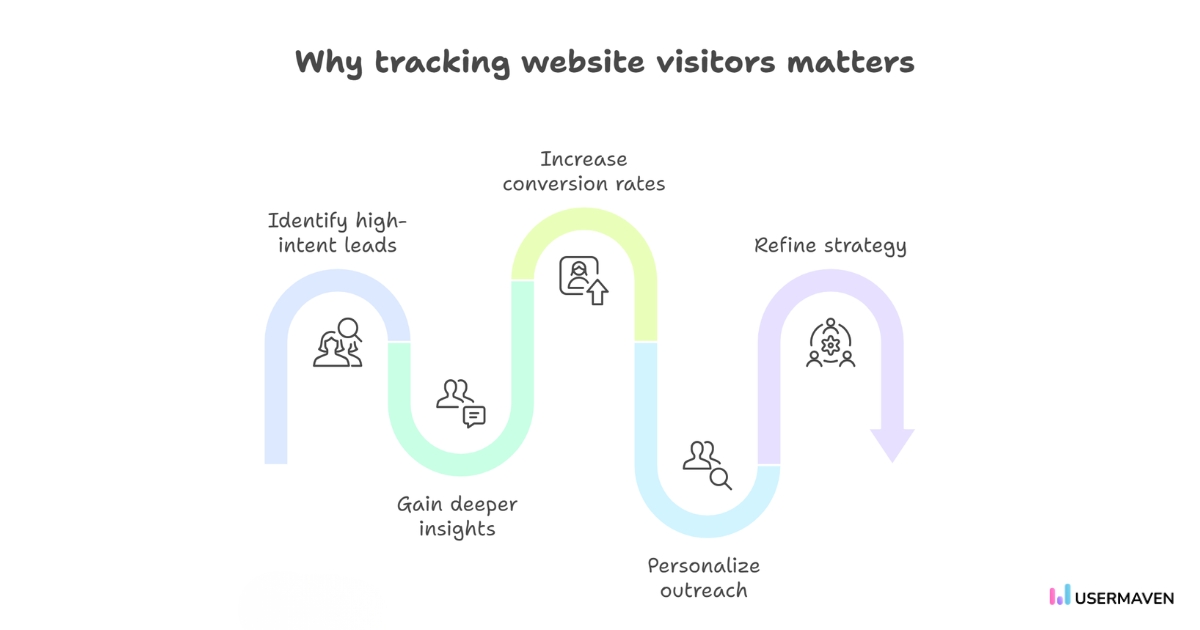
- Identify and qualify high-intent leads:
Track visitors who engage with key pages (pricing, product comparisons, demo requests) to spot strong interest. Integrating with your CRM allows your sales team to focus on high-intent leads. - Gain deeper insight into user behavior:
Track individual actions to understand which content resonates with users and where they hesitate. This helps identify power users, at-risk customers, and upsell opportunities. - Increase conversion rates:
Use funnel analysis and session replays to identify friction points on your site, like broken forms or hidden CTAs. Addressing these issues can drive significant increases in conversions, such as more signups or trial starts. - Personalize sales and marketing outreach:
Leverage detailed visitor data to personalize outreach. Sales teams can reference specific pages or case studies, and marketing can create segments to improve engagement rates and response times. - Refine content and product strategy:
Track which content drives engagement and which features users love. Use product analytics to improve your offerings and create content that resonates with your audience. If you’re focusing on SEO, you can align your visitor data with your best rank tracking software to see which high-ranking keywords actually bring in the most engaged users.
Strategies for tracking website visitors
Having tools is only half the story. You also need simple, clear practices for tracking website visitors that support your goals. A few smart habits can make the difference between a noisy dashboard and data that drives daily decisions.
Set up basic tracking early
Start by making sure a solid base is in place. Add an analytics platform such as Usermaven to your site, and double-check that key pages and events are firing correctly.
This includes pageviews, signups, demo requests, purchases, and any other action that matters to your business model. With this baseline, every new visitor contributes to a rich history rather than leaving a gap.
Integrate across platforms
Data becomes much more useful when your tools talk to each other. Use UTM parameters on campaign tracking so traffic from ads, email, or social posts can be tied back to sessions and conversions.
Connect your website visitor tracking tools to your CRM and messaging tools, so contact records show both marketing activity and in-product behavior. When you see the full picture in one place, it is easier to spot which campaigns move the needle.
Identify key business segments
Not every visitor is worth the same effort.
Use firmographic filters, behavioral data, and traffic sources to identify the segments most valuable to you. This might mean tracking accounts from target industries that view pricing, or returning visitors who read multiple case studies.
Analyze historical behavior after conversions
When a lead converts into a customer, look back on their path rather than just closing the deal in your tools. Use your CRM and analytics platform to see marketing attribution and the features they touched in the weeks before they bought.
For B2B teams, Usermaven works as b2b marketing attribution software that connects visitor activity, source data, conversion paths, and CRM context, so sales and marketing teams can see which visits actually influence pipeline.
Over time, you will notice repeating patterns among your best customers. You can then design campaigns that encourage similar paths for new leads and build retargeting programs that mirror the content steps that worked before.
Quick note: If you’re interested in improving your digital strategy, check out our blog on digital marketing strategy to track users across the web.
Common mistakes to avoid when tracking website visitors
To make sure you’re getting accurate insights and making the most of your tracking efforts, it’s important to steer clear of these common mistakes.
Here’s what to watch out for:
- No clear tracking goals: Not defining specific goals can lead to irrelevant data. Set clear objectives (e.g., track signups or purchases) to ensure meaningful insights.
- Incorrect tool setup: Misconfiguring tracking tools can result in lost or inaccurate data. Double-check settings and ensure your tools are tracking the correct events.
- Ignoring mobile optimization: Failing to optimize tracking for mobile can miss a large portion of traffic. Test tracking setups across both desktop and mobile devices.
- Neglecting privacy regulations: Failing to comply with GDPR or CCPA can lead to legal issues. Ensure you collect user data with proper consent and respect privacy laws.
- Lack of data segmentation: Not segmenting data can make it harder to see important patterns. Use filters to separate data by traffic source, user type, or behavior for clearer insights.
- Not testing your setup: Without proper testing, you risk tracking errors. Test your tracking system thoroughly before going live to ensure accurate data collection.
- Overlooking regular data review: Failing to regularly review data means missed trends. Set up routine check-ins (e.g., weekly or monthly) to make data-driven adjustments.
Top website visitor tracking tools
Here’s a list of popular tools for tracking website visitors. Whether you’re focused on in-depth analytics or identifying visitors, you’ll find the right tool for your needs.
1. Usermaven
Usermaven is an AI-powered analytics and attribution platform that simplifies understanding visitor behavior and conversion paths. By unifying website and product data, it provides clear insights into how different touchpoints drive outcomes.
With automatic event capture and clear insights into visitor flows, funnels, and trends, Usermaven makes it easy to interpret website visitor sources. It streamlines the process of identifying key patterns, helping teams make informed decisions without complex setups.
2. Hotjar
Hotjar is a popular tool for gathering qualitative insights with heatmaps, session recordings, and visitor feedback surveys. It’s ideal for teams looking to understand user interactions more deeply through visualizations and user feedback.
While Hotjar excels in UX and behavioral insights, its reporting and analytics features are more limited than those of other tools.
3. Crazy Egg
Known for heatmaps and scrollmaps, Crazy Egg helps you track website visitors and optimize for conversions with visual feedback. It also offers A/B testing to help refine designs based on visitor behavior.
However, its features are more focused on visual analytics and conversion optimization, so teams looking for comprehensive user journey tracking and attribution may need additional tools to fill in the gaps.
4. Kissmetrics
Kissmetrics tracks customer journeys and behaviors, providing teams with valuable data on how users engage with the product over time. It’s a great fit for product-led teams looking to dig into retention and lifetime value.
That said, Kissmetrics is more focused on customer lifecycle analytics, which may limit its effectiveness for teams primarily interested in broad website visitor tracking or real-time behavior analysis.
5. Google Analytics (GA4)
Google Analytics is a platform widely used for tracking website traffic, engagement, and conversion events. It’s great for getting a high-level view of user activity and integrates well with other Google tools.
The downside is that GA4 can be overwhelming for beginners. While it offers advanced customization, it requires more setup for in-depth tracking, which can be time-consuming for teams looking for quicker insights.
6. HubSpot Marketing Hub
HubSpot offers a complete CRM, marketing automation, and visitor tracking system. It integrates website tracking with sales and marketing workflows, providing a seamless experience for teams looking to tie engagement to lead nurturing.
However, HubSpot’s pricing can quickly scale up as you add more features or contacts. Additionally, integrations with other sales and marketing tools may be limited on lower-tier plans, requiring a higher-tier plan for full functionality.
7. ActiveCampaign
ActiveCampaign offers marketing automation, CRM, and behavioral tracking features. It’s great for teams looking to tie website visitor data to email campaigns and automations.
One limitation to consider is that while ActiveCampaign is powerful for email marketing, its website tracking features are not as advanced as those in more specialized analytics tools. Additionally, more complex workflows require higher-tier pricing.
8. RB2B
RB2B specializes in visitor identification and lead enrichment, focusing on B2B traffic and matching it to company profiles. It’s useful for teams that want to prioritize sales outreach based on visitor behavior.
However, RB2B may not be the best fit for teams that need broad site analytics, as it is more specialized in identifying leads and doesn’t provide deep insights into visitor interactions across your entire site.
9. ZoomInfo
ZoomInfo provides a comprehensive B2B contact database along with visitor identification, helping sales teams find companies visiting their site. It’s great for businesses looking for a mix of lead enrichment and engagement tracking.
The drawback is that ZoomInfo’s pricing can be expensive for small to mid-sized teams, and its tools are geared more toward large-scale sales operations rather than general visitor tracking.
10. Apollo
Apollo combines a contact database with visitor tracking and engagement insights, helping teams identify potential leads and automate outreach.
While Apollo offers powerful data insights, it may not provide the same level of detailed behavioral analytics as specialized website tracking tools. Additionally, its visitor identification features can be limited on lower-tier plans.
To sum it up,
Good data shouldn’t be a chore to collect. When you can see the exact steps your users take, you stop wasting time on “best guesses” and start making changes that actually improve your conversion rate.
Usermaven was designed to make visitor tracking easier. As marketing attribution software, it connects visitor activity, traffic sources, events, and conversion paths from the first click to the final signup. That way, teams can turn raw website behavior into growth decisions without spending extra time auditing their setup.
Ready to see how your visitors are truly engaging with your site? Start a free trial or book a demo to see how Usermaven simplifies your tracking.
Leave a Reply